<?xml version="1.0" encoding="utf-8"?>
<feed xmlns="http://www.w3.org/2005/Atom">
  <author>
    <name>onlyrxn</name>
  </author>
  <generator uri="https://hexo.io/">Hexo</generator>
  <id>https://blog.onlyrxn.top/</id>
  <link href="https://blog.onlyrxn.top/" rel="alternate"/>
  <link href="https://blog.onlyrxn.top/atom.xml" rel="self"/>
  <rights>All rights reserved 2026, onlyrxn</rights>
  <subtitle>孤灯不明思欲绝，卷帷望月空长叹</subtitle>
  <title>onlyrxn</title>
  <updated>2026-04-20T10:57:39.774Z</updated>
  <entry>
    <author>
      <name>onlyrxn</name>
    </author>
    <category term="blog" scheme="https://blog.onlyrxn.top/categories/blog/"/>
    <category term="随想" scheme="https://blog.onlyrxn.top/tags/%E9%9A%8F%E6%83%B3/"/>
    <content>
      <![CDATA[<div class="hbe hbe-container" id="hexo-blog-encrypt" data-wpm="密码错误，请重试。" data-whm="内容认证失败，但仍可尝试查看。">  <script id="hbeData" type="hbeData" data-hmacdigest="7c0567f0dd9575c5e5f316b95603da1f32b863432ea795de89de4e5aa392a9c5">e1ad6e1d884f66cc938f02f5c810dde61e09f4187485076f26780fdc5b2458ef9bf38306beb2df4548af7d0321098fc66a4c1c463c0f177bf50461ed22fa748a3d2e7f11c285de9874c5d43d0da2cf37e996ca165c690f27cd380a799e841ecb71050fd48a8e6aa3b9281a94b572bacc5b7aad9fce4565b168f43c0f2e1ea1c0d76e41ebd114157dc8c4e76f962d99ee2889fa9bc35aa56e7f4eeb27fedaafefd7a8632093402e0c8d4ba509003f57a93c2c2929dfc07c180ab72890afce31a69c46f321f8af6ef05d7fd48250311473f13f76d487981dc90b4e92801b3c3cc0241c8b264f916abf42911523cf78275277617851e88828ef8efbedbc6ced9afece6e42cf01f5e6c3259d14aee86807cd19a04e307d826c83daa00fdcbc9eda4308123f02727cc00b5bb1bedb179d0188a9eeae78490f8aa951b1695a66f2ab5c39c6db2f6f4bbc00527d3789bd79daec4b163fbde18a6798a350a6f8b55fa623412eb62bc6b56abdeba86f4e35fb6f02</script>  <div class="hbe hbe-content">    <div class="hbe hbe-input hbe-input-default">      <input class="hbe hbe-input-field hbe-input-field-default" type="password" id="hbePass">      <label class="hbe hbe-input-label hbe-input-label-default" for="hbePass">        <span class="hbe hbe-input-label-content hbe-input-label-content-default">请输入密码查看本文。</span>      </label>    </div>  </div></div><script data-pjax src="/lib/hbe.js"></script><link href="/css/hbe.style.css" rel="stylesheet" type="text/css">]]>
    </content>
    <id>https://blog.onlyrxn.top/2026/04/18/%E4%BB%8A%E6%97%B6%E4%BB%8A%E6%97%A5%E6%89%80%E6%83%B3%E4%B9%8B%E4%BA%8B/</id>
    <link href="https://blog.onlyrxn.top/2026/04/18/%E4%BB%8A%E6%97%B6%E4%BB%8A%E6%97%A5%E6%89%80%E6%83%B3%E4%B9%8B%E4%BA%8B/"/>
    <published>2026-04-17T16:00:00.000Z</published>
    <summary>这里的内容加密了，需要密码哦。</summary>
    <title>今时今日所想之事</title>
    <updated>2026-04-20T10:57:39.774Z</updated>
  </entry>
  <entry>
    <author>
      <name>onlyrxn</name>
    </author>
    <category term="blog" scheme="https://blog.onlyrxn.top/categories/blog/"/>
    <category term="单片机" scheme="https://blog.onlyrxn.top/tags/%E5%8D%95%E7%89%87%E6%9C%BA/"/>
    <content>
      <![CDATA[<h2 id="一、独立按键"><a href="#一、独立按键" class="headerlink" title="一、独立按键"></a>一、独立按键</h2><p><img onerror="imgOnError(this);" data-fancybox="gallery" src="https://img.onlyrxn.cc.cd/PicGo/%E5%B1%8F%E5%B9%95%E6%88%AA%E5%9B%BE%202026-04-11%20161150.png" alt="独立按键原理图" data-caption="独立按键原理图" loading="lazy"><br>先构建空工程，并打开创建HEX文件的选项。</p><figure class="highlight c"><table><tr><td class="code"><pre><code class="hljs c"><span class="hljs-type">void</span> <span class="hljs-title function_">main</span><span class="hljs-params">()</span>&#123;<br>  <br>&#125;<br></code></pre></td></tr></table></figure><p>观察原理图可知K1按键由P31引脚控制,当按下K1时由高电平转为低电平,我们可以通过一个简单的判断语句来判断按键的按下和松开并做出反应，例如：</p><figure class="highlight c"><table><tr><td class="code"><pre><code class="hljs c"><span class="hljs-type">void</span> <span class="hljs-title function_">main</span><span class="hljs-params">()</span>&#123;<br>  <span class="hljs-keyword">if</span>(P3_1==<span class="hljs-number">0</span>)&#123;<br>    P2=<span class="hljs-number">0xFE</span>;<br>  &#125;<br>  <span class="hljs-keyword">else</span>&#123;<br>    P2=<span class="hljs-number">0xFF</span>;<br>  &#125;<br>&#125;<br></code></pre></td></tr></table></figure><p>由于此处的独立按键相当于常闭按钮，所以在编译程序并下载到单片机后我们会发现按键在按下之后松开的瞬间，LED灯就会熄灭。要想实现按下按键让灯常亮，再按下一次按键让灯常灭我们就需要对代码进行适度修改。</p><blockquote><p>这里提供一种思路：引入一个随按键每次按下而改变的值，通过这个值来控制LED灯的亮灭,实现按键的伪自锁（因为按键按下后就会松开，并没有保持按下状态）。</p></blockquote><figure class="highlight c"><table><tr><td class="code"><pre><code class="hljs c">bit key = <span class="hljs-number">0</span>; <span class="hljs-comment">//引入一个值key</span><br><span class="hljs-type">void</span> <span class="hljs-title function_">main</span><span class="hljs-params">()</span>&#123;<br>    <span class="hljs-keyword">while</span>(<span class="hljs-number">1</span>) <span class="hljs-comment">//进入死循环</span><br>    &#123;<br>        <span class="hljs-keyword">if</span>(P3_1==<span class="hljs-number">0</span>) <span class="hljs-comment">//判断按键的按下</span><br>        &#123;<br>            <span class="hljs-keyword">while</span>(P3_1==<span class="hljs-number">0</span>); <span class="hljs-comment">//当松开按键后括号内条件不成立运行后续程序</span><br>            key=!key; <span class="hljs-comment">//反转引入变量key的值</span><br>        &#125;<br>        <span class="hljs-keyword">if</span>(key) P2_0=<span class="hljs-number">0</span>; <span class="hljs-comment">//点亮LED</span><br>        <span class="hljs-keyword">else</span> P2_0=<span class="hljs-number">1</span>; <span class="hljs-comment">//熄灭LED</span><br>    &#125;<br>&#125;<br></code></pre></td></tr></table></figure><p>由于单片机的按键存在抖动（由机械触点的弹性及电气特性引起，在按下或释放瞬间会产生短暂的多次开关信号波动）。通常按键在按下沿与释放沿各存在约 5～10ms 的抖动，合计抖动时长约 10～20ms。在此期间，按键电平不稳定，单片机可能会将一次按键操作识别为多次触发，导致受控元件出现频繁通断、状态反复切换的现象。在这里表现为 LED 出现异常闪烁。像LED这样的小电流元器件可能不会造成什么影响，但若控制对象为工业上的继电器、电机等大功率或感性负载，频繁通断则可能造成触点烧蚀、器件过压损坏等不可逆影响。所以一般的类似程序都会对程序进行消抖，用于减少按键抖动的影响。</p><figure class="highlight c"><table><tr><td class="code"><pre><code class="hljs c"><span class="hljs-comment">//对上述程序进行简单的延时消抖后：</span><br><span class="hljs-meta">#<span class="hljs-keyword">include</span> <span class="hljs-string">&lt;REGX52.H&gt;</span></span><br><span class="hljs-meta">#<span class="hljs-keyword">define</span> delay 10</span><br>bit key = <span class="hljs-number">0</span>;<br><span class="hljs-type">void</span> <span class="hljs-title function_">delay_ms</span><span class="hljs-params">(<span class="hljs-type">unsigned</span> <span class="hljs-type">int</span> ms)</span> &#123;<br>    <span class="hljs-type">unsigned</span> <span class="hljs-type">int</span> i, j;<br>    <span class="hljs-keyword">for</span>(i = <span class="hljs-number">0</span>; i &lt; ms; i++)<br>        <span class="hljs-keyword">for</span>(j = <span class="hljs-number">0</span>; j &lt; <span class="hljs-number">120</span>; j++);<br>&#125;<br><span class="hljs-type">void</span> <span class="hljs-title function_">main</span><span class="hljs-params">()</span> &#123;<br>    <span class="hljs-keyword">while</span>(<span class="hljs-number">1</span>) &#123;<br>        <span class="hljs-keyword">if</span>(P3_1 == <span class="hljs-number">0</span>) &#123;<br>            delay_ms(delay);<br>            <span class="hljs-keyword">if</span>(P3_1 == <span class="hljs-number">0</span>) &#123; <br>                key = !key; <br>                <span class="hljs-keyword">while</span>(P3_1 == <span class="hljs-number">0</span>);<br>                delay_ms(delay);<br>            &#125;<br>        &#125;<br>        <span class="hljs-keyword">if</span>(key) P2_0=<span class="hljs-number">0</span>;<br>        <span class="hljs-keyword">else</span> P2_0=<span class="hljs-number">1</span>;<br>    &#125;<br>&#125;<br></code></pre></td></tr></table></figure><h2 id="二、按键控制位移"><a href="#二、按键控制位移" class="headerlink" title="二、按键控制位移"></a>二、按键控制位移</h2>]]>
    </content>
    <id>
      <![CDATA[https://blog.onlyrxn.top/2026/04/11/%E7%8B%AC%E7%AB%8B%E6%8C%89%E9%94%AE&%E6%8C%89%E9%94%AE%E6%8E%A7%E5%88%B6%E7%A7%BB%E4%BD%8D&%E6%8C%89%E9%94%AE%E5%87%BD%E6%95%B0%E7%9A%84%E5%B0%81%E8%A3%85/]]>
    </id>
    <link href="https://blog.onlyrxn.top/2026/04/11/%E7%8B%AC%E7%AB%8B%E6%8C%89%E9%94%AE&amp;%E6%8C%89%E9%94%AE%E6%8E%A7%E5%88%B6%E7%A7%BB%E4%BD%8D&amp;%E6%8C%89%E9%94%AE%E5%87%BD%E6%95%B0%E7%9A%84%E5%B0%81%E8%A3%85/"/>
    <published>2026-04-10T16:00:00.000Z</published>
    <summary>
      <![CDATA[<h2 id="一、独立按键"><a href="#一、独立按键" class="headerlink" title="一、独立按键"></a>一、独立按键</h2><p><img onerror="imgOnError(this);" data-fancybox="galler]]>
    </summary>
    <title>独立按键、按键控制移位、按键函数的封装</title>
    <updated>2026-04-20T13:26:08.512Z</updated>
  </entry>
  <entry>
    <author>
      <name>onlyrxn</name>
    </author>
    <category term="blog" scheme="https://blog.onlyrxn.top/categories/blog/"/>
    <category term="单片机" scheme="https://blog.onlyrxn.top/tags/%E5%8D%95%E7%89%87%E6%9C%BA/"/>
    <content>
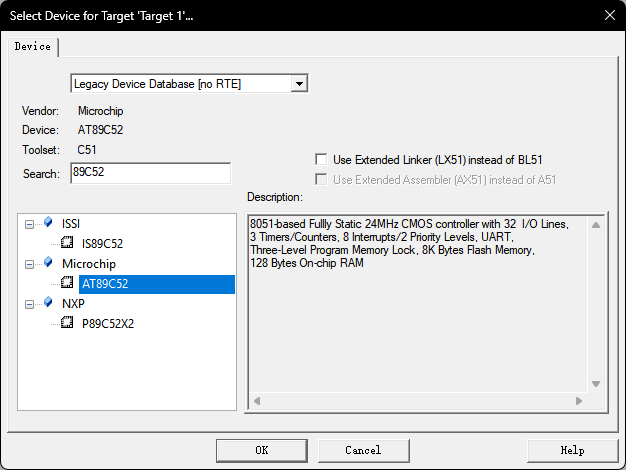
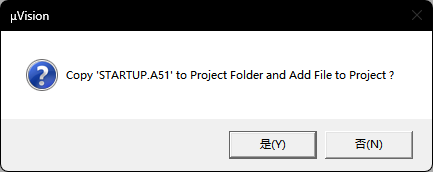
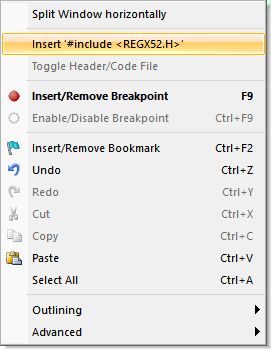
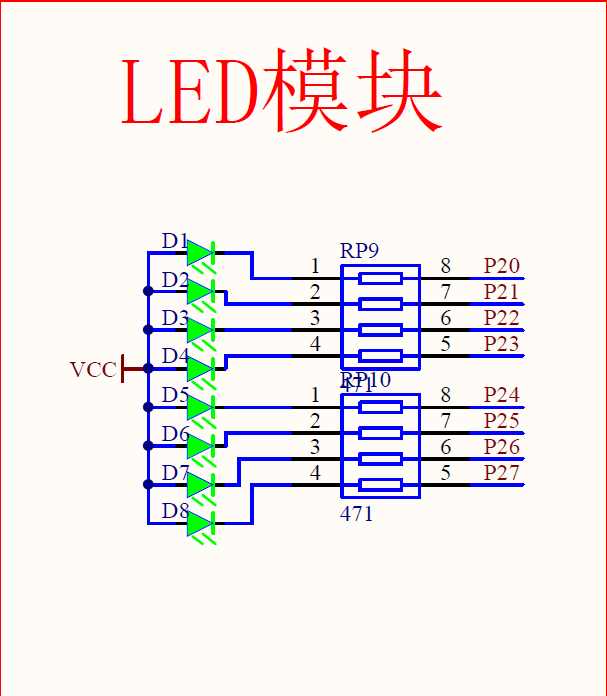
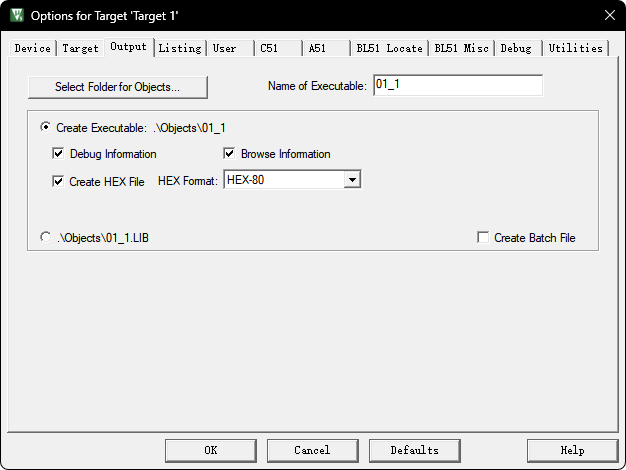
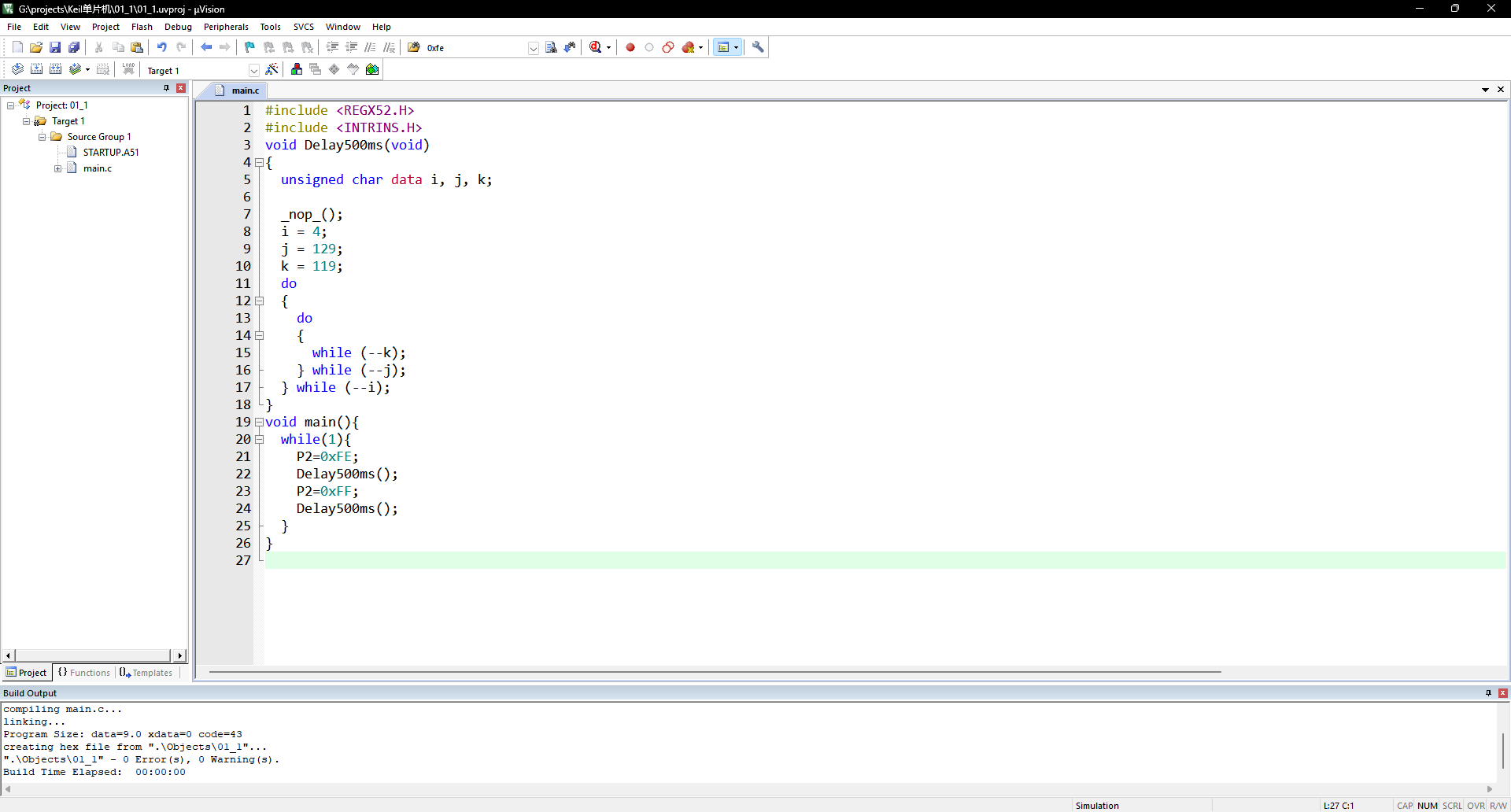
      <![CDATA[<h2 id="一、安装必要软件"><a href="#一、安装必要软件" class="headerlink" title="一、安装必要软件"></a>一、安装必要软件</h2><p>1，keil uvision5 <a href="https://www.keil.com/demo/eval/c51.htm">点此链接前往官网下载</a></p><p>2，STC-ISP <a href="https://stcmicro.com/rar/stc-isp6.96s.rar">点此链接前往官网下载</a></p><blockquote><p>tips:上述两程序均为完成本文时对应程序的最新版本，链接均指向官网链接</p></blockquote><h2 id="二、创建空工程"><a href="#二、创建空工程" class="headerlink" title="二、创建空工程"></a>二、创建空工程</h2><p>启动<strong>Keil</strong>，依次点击<strong>Project</strong>→<strong>New uVision Project</strong>，选择用于存储工程的文件夹并为工程命名。</p><p><img src="https://free.picui.cn/free/2026/04/08/69d64ddca03f9.png"></p><p>随后会弹出选择单片机型号的窗口，本人单片机型号为STC89C52RC，这里选择MicroChip的AT89C52，实际请根据自己单片机型号进行选择。</p><p><img src="https://free.picui.cn/free/2026/04/08/69d64e28986d2.png"></p><p>选择完成后会弹出选择是否加入初始化代码询问的信息，此处通常选择“是”，初学者不知道如何修改启动代码可以选择“否”。</p><p><img src="https://free.picui.cn/free/2026/04/08/69d64e48312b3.png"></p><p>随后依次展开Project窗口的<strong>Tatget 1</strong>→<strong>Source Group 1</strong>，右键<strong>Source Group 1</strong>，点击<strong>Add New Item to Group ‘Source Group 1’</strong>，命名为main.c，写入如下代码：</p><p><img src="https://img.onlyrxn.cc.cd/PicGo/%E5%B1%8F%E5%B9%95%E6%88%AA%E5%9B%BE%202026-04-08%20205042.png"></p><figure class="highlight c"><table><tr><td class="code"><pre><code class="hljs c"><span class="hljs-type">void</span> <span class="hljs-title function_">main</span><span class="hljs-params">()</span>&#123;<br><br>&#125;<br></code></pre></td></tr></table></figure><p>这个工程编译运行后会让你的单片机回到初始状态。</p><h2 id="三、点亮LED灯"><a href="#三、点亮LED灯" class="headerlink" title="三、点亮LED灯"></a>三、点亮LED灯</h2><p>将光标移动至main.c第一行void之前，右键打开菜单，单击**Insert #include&lt;REGX52.H&gt;**，也可自己在第一行输入</p><figure class="highlight c"><table><tr><td class="code"><pre><code class="hljs c"><span class="hljs-meta">#<span class="hljs-keyword">include</span><span class="hljs-string">&lt;REGX52.H&gt;</span></span><br></code></pre></td></tr></table></figure><p><img src="https://free.picui.cn/free/2026/04/08/69d650b07e82a.png"></p><p>查看单片机LED模块原理图，可知</p><blockquote><p>tips：此处为普中开发板LED模块原理图，不同型号单片机的原理也可能不同，请根据自己单片机型号查找原理图，建议询问自己购买单片机的店铺客服。且控制引脚高低电平有多种方式方式，这里以字节操作语句为例。</p></blockquote><p><img src="https://free.picui.cn/free/2026/04/08/69d651f8311c9.png"></p><p>此处提供两个实例代码，并说明其作用：</p><figure class="highlight c"><table><tr><td class="code"><pre><code class="hljs c"><span class="hljs-meta">#<span class="hljs-keyword">include</span> <span class="hljs-string">&lt;REGX52.H&gt;</span></span><br><span class="hljs-type">void</span> <span class="hljs-title function_">main</span><span class="hljs-params">()</span>&#123;<br>    P2=<span class="hljs-number">0xFE</span>;<br>    <span class="hljs-comment">//此处FE为16进制，转换为二进制为11111110，此代码可以点亮单片机LED模块第一个LED灯</span><br>&#125;<br></code></pre></td></tr></table></figure><figure class="highlight c"><table><tr><td class="code"><pre><code class="hljs c"><span class="hljs-meta">#<span class="hljs-keyword">include</span> <span class="hljs-string">&lt;REGX52.H&gt;</span></span><br><span class="hljs-type">void</span> <span class="hljs-title function_">main</span><span class="hljs-params">()</span>&#123;<br>    P2=<span class="hljs-number">0xFC</span>;<br>    <span class="hljs-comment">//此处FC为16进制，转换为二进制为11111100，此代码可以点亮单片机LED模块前两个LED灯</span><br>&#125;<br></code></pre></td></tr></table></figure><p>显然这个程序可以通过一个由8位二进制转换而来的16进制控制单片机的LED灯，8位二进制的0代表灯亮，1代表灯灭，8位二进制从右往左对应单片机的从左往右。</p><p>要生成可在STC-ISP下载到单片机的Hex文件需要打开Keil uvision的<strong>Creat HEX File</strong>选项</p><p><img src="https://free.picui.cn/free/2026/04/09/69d7a88b1c0c8.png"></p><h2 id="四、Led闪烁"><a href="#四、Led闪烁" class="headerlink" title="四、Led闪烁"></a>四、Led闪烁</h2><p>打开STC-ISP程序，在工具栏找到<strong>软件延时计算器</strong>，自由设定定时长度，此处以500ms为例。</p><blockquote><p>tips：注意选择自己单片机型号，此处为STC89</p></blockquote><p><img src="https://free.picui.cn/free/2026/04/09/69d7aa788eca6.png"></p><p>生成C代码并复制粘贴到keil uvision中，完成后续程序。</p><figure class="highlight c"><table><tr><td class="code"><pre><code class="hljs C"><span class="hljs-meta">#<span class="hljs-keyword">include</span> <span class="hljs-string">&lt;REGX52.H&gt;</span></span><br><span class="hljs-meta">#<span class="hljs-keyword">include</span> <span class="hljs-string">&lt;INTRINS.H&gt;</span></span><br><span class="hljs-comment">// 此处库INTRINS.H为函数_nop_()所用到的</span><br><span class="hljs-type">void</span> <span class="hljs-title function_">Delay500ms</span><span class="hljs-params">(<span class="hljs-type">void</span>)</span><br>&#123;<br>    <span class="hljs-type">unsigned</span> <span class="hljs-type">char</span> data i, j, k;<br><br>    _nop_();<br>    i = <span class="hljs-number">4</span>;<br>    j = <span class="hljs-number">129</span>;<br>    k = <span class="hljs-number">119</span>;<br>    <span class="hljs-keyword">do</span><br>    &#123;<br>        <span class="hljs-keyword">do</span><br>        &#123;<br>            <span class="hljs-keyword">while</span> (--k);<br>        &#125; <span class="hljs-keyword">while</span> (--j);<br>    &#125; <span class="hljs-keyword">while</span> (--i);<br>&#125;<br><span class="hljs-type">void</span> <span class="hljs-title function_">main</span><span class="hljs-params">()</span>&#123;<br>    <span class="hljs-keyword">while</span>(<span class="hljs-number">1</span>)&#123;<br>        P2=<span class="hljs-number">0xFE</span>; <span class="hljs-comment">//点亮led灯</span><br>        Delay500ms(); <span class="hljs-comment">//延时500ms</span><br>        P2=<span class="hljs-number">0xFF</span>; <span class="hljs-comment">//熄灭led灯</span><br>        Delay500ms(); <span class="hljs-comment">//延时500ms</span><br>    &#125;<br>&#125;<br></code></pre></td></tr></table></figure><h2 id="五、LED流水灯"><a href="#五、LED流水灯" class="headerlink" title="五、LED流水灯"></a>五、LED流水灯</h2><p>由四的LED闪烁我们可以直觉的想到可以让LED灯从左至右依次点亮后熄灭，以下代码可以实现：</p><figure class="highlight c"><table><tr><td class="code"><pre><code class="hljs C"><span class="hljs-type">void</span> <span class="hljs-title function_">main</span><span class="hljs-params">()</span>&#123;<br>    <span class="hljs-keyword">while</span>(<span class="hljs-number">1</span>)&#123;<br>        P2=<span class="hljs-number">0xFE</span>; <span class="hljs-comment">//点亮led灯1,1111 1110</span><br>        Delay500ms(); <span class="hljs-comment">//延时500ms</span><br>        P2=<span class="hljs-number">0xFD</span>; <span class="hljs-comment">//点亮led灯2，1111 1101</span><br>        Delay500ms(); <span class="hljs-comment">//延时500ms</span><br>        P2=<span class="hljs-number">0xFB</span>; <span class="hljs-comment">//点亮led灯3，1111 1011</span><br>        Delay500ms(); <span class="hljs-comment">//延时500ms</span><br>        P2=<span class="hljs-number">0xF7</span>; <span class="hljs-comment">//点亮led灯4，1111 0111</span><br>        Delay500ms(); <span class="hljs-comment">//延时500ms</span><br>        P2=<span class="hljs-number">0xEF</span>; <span class="hljs-comment">//点亮led灯5，1110 1111</span><br>        Delay500ms(); <span class="hljs-comment">//延时500ms</span><br>        P2=<span class="hljs-number">0xDF</span>; <span class="hljs-comment">//点亮led灯6，1101 1111</span><br>        Delay500ms(); <span class="hljs-comment">//延时500ms</span><br>        P2=<span class="hljs-number">0xBF</span>; <span class="hljs-comment">//点亮led灯7，1011 1111</span><br>        Delay500ms(); <span class="hljs-comment">//延时500ms</span><br>        P2=<span class="hljs-number">0x7F</span>; <span class="hljs-comment">//点亮led灯8，0111 1111</span><br>        Delay500ms(); <span class="hljs-comment">//延时500ms</span><br>        P2=<span class="hljs-number">0xFF</span>; <span class="hljs-comment">//熄灭所有led灯,1111 1111</span><br>        Delay500ms(); <span class="hljs-comment">//延时500ms</span><br>    &#125;<br>&#125;<br></code></pre></td></tr></table></figure><p>这是一种极其原始的方法，代码繁琐但必定有效，更高阶一些的写法,如<strong>unsigned char</strong>可以让控制LED的八位二进制的高电平位从右往左移动，对应单片机LED灯从左往右依次点亮后熄灭，实现流水灯的效果。</p><figure class="highlight c"><table><tr><td class="code"><pre><code class="hljs c"><span class="hljs-type">unsigned</span> <span class="hljs-type">char</span> ucled=<span class="hljs-number">0x01</span>; <span class="hljs-comment">//0000 0001</span><br><span class="hljs-type">void</span> <span class="hljs-title function_">main</span><span class="hljs-params">()</span>&#123;<br>    <span class="hljs-keyword">while</span>(<span class="hljs-number">1</span>)&#123;<br>    P2=~ucled;<br>    Delay500ms();<br>    ucled&lt;&lt;=<span class="hljs-number">1</span>;<br>    <span class="hljs-keyword">if</span>(ucled==<span class="hljs-number">0x00</span>) ucled=<span class="hljs-number">0x01</span>; <span class="hljs-comment">//循环</span><br>    &#125;<br>&#125;<br></code></pre></td></tr></table></figure>]]>
    </content>
    <id>
      <![CDATA[https://blog.onlyrxn.top/2026/04/08/%E6%96%B0%E5%BB%BA%E5%B7%A5%E7%A8%8B&%E7%82%B9%E4%BA%AELED&LED%E9%97%AA%E7%83%81&LED%E6%B5%81%E6%B0%B4%E7%81%AF/]]>
    </id>
    <link href="https://blog.onlyrxn.top/2026/04/08/%E6%96%B0%E5%BB%BA%E5%B7%A5%E7%A8%8B&amp;%E7%82%B9%E4%BA%AELED&amp;LED%E9%97%AA%E7%83%81&amp;LED%E6%B5%81%E6%B0%B4%E7%81%AF/"/>
    <published>2026-04-07T16:00:00.000Z</published>
    <summary>
      <![CDATA[<h2 id="一、安装必要软件"><a href="#一、安装必要软件" class="headerlink" title="一、安装必要软件"></a>一、安装必要软件</h2><p>1，keil uvision5 <a href="https://www.keil.com/]]>
    </summary>
    <title>新建工程、点亮LED、LED闪烁、LED流水灯</title>
    <updated>2026-04-20T13:32:17.978Z</updated>
  </entry>
  <entry>
    <author>
      <name>onlyrxn</name>
    </author>
    <category term="blog" scheme="https://blog.onlyrxn.top/categories/blog/"/>
    <content>
      <![CDATA[<p>Welcome to <a href="https://hexo.io/">Hexo</a>! This is your very first post. Check <a href="https://hexo.io/docs/">documentation</a> for more info. If you get any problems when using Hexo, you can find the answer in <a href="https://hexo.io/docs/troubleshooting.html">troubleshooting</a> or you can ask me on <a href="https://github.com/hexojs/hexo/issues">GitHub</a>.</p><h2 id="Quick-Start"><a href="#Quick-Start" class="headerlink" title="Quick Start"></a>Quick Start</h2><h3 id="Create-a-new-post"><a href="#Create-a-new-post" class="headerlink" title="Create a new post"></a>Create a new post</h3><figure class="highlight bash"><table><tr><td class="code"><pre><code class="hljs bash">$ hexo new <span class="hljs-string">&quot;My New Post&quot;</span><br></code></pre></td></tr></table></figure><p>More info: <a href="https://hexo.io/docs/writing.html">Writing</a></p><h3 id="Run-server"><a href="#Run-server" class="headerlink" title="Run server"></a>Run server</h3><figure class="highlight bash"><table><tr><td class="code"><pre><code class="hljs bash">$ hexo server<br></code></pre></td></tr></table></figure><p>More info: <a href="https://hexo.io/docs/server.html">Server</a></p><h3 id="Generate-static-files"><a href="#Generate-static-files" class="headerlink" title="Generate static files"></a>Generate static files</h3><figure class="highlight bash"><table><tr><td class="code"><pre><code class="hljs bash">$ hexo generate<br></code></pre></td></tr></table></figure><p>More info: <a href="https://hexo.io/docs/generating.html">Generating</a></p><h3 id="Deploy-to-remote-sites"><a href="#Deploy-to-remote-sites" class="headerlink" title="Deploy to remote sites"></a>Deploy to remote sites</h3><figure class="highlight bash"><table><tr><td class="code"><pre><code class="hljs bash">$ hexo deploy<br></code></pre></td></tr></table></figure><p>More info: <a href="https://hexo.io/docs/one-command-deployment.html">Deployment</a></p>]]>
    </content>
    <id>https://blog.onlyrxn.top/2026/04/04/hello-world/</id>
    <link href="https://blog.onlyrxn.top/2026/04/04/hello-world/"/>
    <published>2026-04-03T16:00:00.000Z</published>
    <summary>
      <![CDATA[<p>Welcome to <a href="https://hexo.io/">Hexo</a>! This is your very first post. Check <a href="https://hexo.io/docs/">documentation</a> for]]>
    </summary>
    <title>Hello World</title>
    <updated>2026-04-20T14:43:39.566Z</updated>
  </entry>
</feed>